跳至主要内容

Resolving Issues with Your Roll-to-Sheet Cutting Machine: A Practical Guide


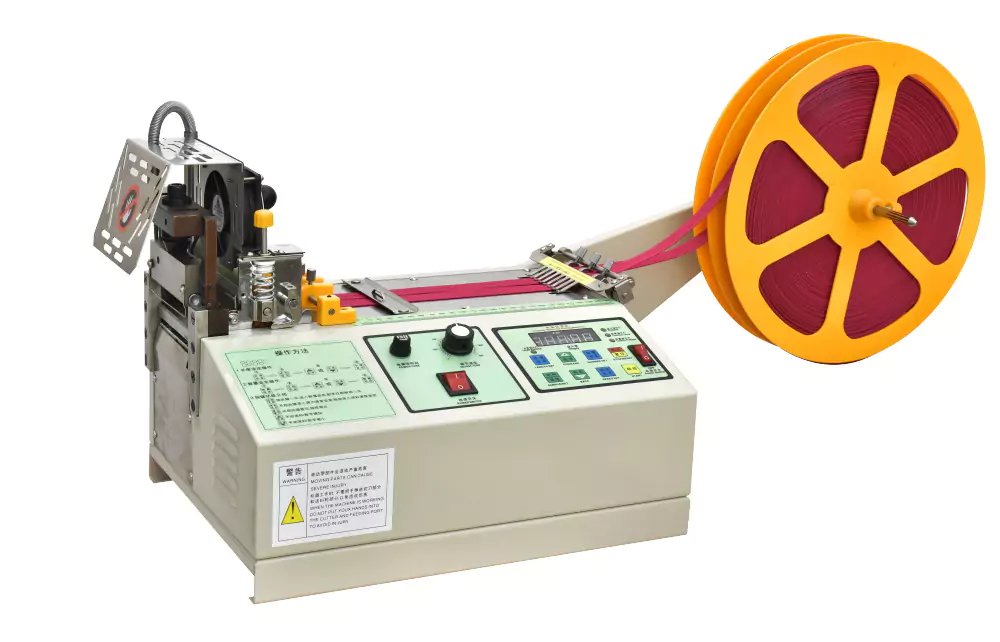
Encountering problems with your Roll-to-Sheet Cutting Machine can be frustrating, especially when deadlines for grosgrain ribbon printing and cutting projects loom. Don't worry! This guide covers common malfunctions and their straightforward solutions, helping you restore your machine's performance and ensure smooth, accurate cuts.

Pinpointing the Problem: Common Causes of Cutting Malfunctions

Several factors can lead to cutting inconsistencies. Let's break down typical issues and how to fix them:

1. Worn or Damaged Cutting Components:

 Knife Bearing Failure: A compromised or broken knife bearing can prevent the cutting blade from moving smoothly.

 Solution: Inspect the bearing; replace it if it shows signs of wear or breakage.

 Dull Middle Knife: If the middle knife is blunt or damaged, your cuts will likely be uneven.

 Solution: Either replace the knife entirely or, if available, rotate it to use an unblunted side.

2. Tension and Alignment Problems:

 Broken Tube Pin: This small component is vital for maintaining proper material tension.

 Solution: Use a small punch tool to secure or replace a broken pin.

 Excessive Adjustment Tension: Over-tightening can lead to inaccurate cuts.

 Solution: Locate the hexagon socket set screw and reduce the tension until it's appropriate for your material.

3. Material Feeding Difficulties:

 Greasy Sheet or Drive Belt: Oil contamination on the material or drive belt can cause slippage.

 Solution: Thoroughly clean all affected parts and reassemble them correctly.

 Loose Transmission Belt: A slack belt means the material won't feed consistently during cutting.

 Solution: Tighten the transmission belt by adjusting the frame seat or repositioning the motor.

 Incorrect Roller Gap for Thin Materials: If the gap between the unwinding rollers is too narrow, thin materials like PP strap can experience cutting issues.

 Solution: Adjust the roller gap to match the specific thickness of your material.

4. Sensor Malfunctions:

 Faulty Magnetron (Belt Cutting Sensor): This sensor detects the material's presence, crucial for precise cuts.

 Solution: If you suspect issues with magnetic sheets or sensor damage, refer to your user manual or contact a certified technician for diagnostic steps.

5. Crossbar Imbalance:

 Improper Crossbar Balance: An unbalanced crossbar directly impacts cutting precision.

 Solution: Adjust the crossbar to its optimal balanced position to ensure stable and smooth operation.

Ensuring Smooth Operation and Longevity

By understanding these common problems and their fixes, you can effectively address minor issues with your Roll-to-Sheet Cutting Machine, ensuring your grosgrain ribbon printing and cutting tasks proceed without unnecessary delays. Always consult your user manual for detailed instructions and consider professional assistance for more complex repairs.

Investing in Longevity:

Regular maintenance is key to extending the life of your machine. Adhering to the manufacturer's recommended cleaning and maintenance schedule can proactively prevent many of these issues, saving you time and effort in the long run.

With proactive upkeep and the ability to troubleshoot minor hitches, your Roll-to-Sheet Cutting Machine will continue to operate efficiently, providing consistent, high-quality results for all your ribbon cutting and printing needs.


评论

此博客中的热门博文

Troubleshooting Common Automatic Wire Cutter and Stripper Issues

Experiencing problems with your automatic wire cutter and stripper ? Many common issues can be quickly resolved with simple adjustments and maintenance. This guide will help you diagnose and fix the most frequent challenges, ensuring your machine operates efficiently. Unstripped Wire Ends If your machine isn't stripping wire ends properly, first examine the cutting depth. If the cut is too shallow, adjust the wire diameter setting to a larger value. Insufficient pressure from the feeding wheel can also be a culprit; in this case, increase the air pressure. Don't forget to clean the feeding wheel thoroughly, as accumulated dirt can hinder its grip. Finally, review your retraction parameters—they might be set incorrectly (either too large or too small), and always confirm normal air supply to the machine. Issues with Stripping Wire Tails Similar to wire ends, unstripped tails often point to a shallow cutting depth. Try decreasing the wire diameter parameter slightly. A loose wire...

Unveiling Excellence: The Apex of Precision in Tubing Cutting

Welcome to a new era of engineering where innovation meets superior performance. Our tubing cutting machines are not just tools; they redefine the art of tube manipulation, offering unmatched accuracy and efficiency. Prepare to explore the pinnacle of cutting technology. Precision, Elevated Whether you're working with shrink tubing or sensitive medical materials, our machines establish a new benchmark for precision. Experience consistently clean, flawless cuts every time, ensuring your materials are handled with the greatest care. Bid farewell to uneven edges and embrace a new standard of excellence in your operations. Seamless Efficiency and Advanced Capabilities Designed with advanced features, our tubing cutters are built to streamline your entire workflow. They boast adjustable cutting speeds, versatile peripheral integration, and impeccable cut-to-length accuracy. These capabilities empower you to achieve exceptional results across diverse applications. From intricate medica...

Troubleshooting Line Setting Issues in Your Multi-Core Wire Stripper & Crimper

  Your multi-core wire stripper and crimper is a valuable asset, designed to streamline wire processing. However, it can be frustrating when the machine only performs the initial line setting action without completing the full stripping and crimping process. This guide explores the potential reasons for this problem and offers solutions to get your machine back to optimal performance. Understanding Why Only Setting Occurs Several factors can cause your machine to clamp the wire but then fail to strip and crimp: Power Supply Instability: An inconsistent or insufficient power supply can disrupt machine operations. This might be due to a loose or damaged power cable causing voltage fluctuations. Sensor Malfunctions: Faulty sensors are critical culprits. A loose or damaged sensor connection, or even incorrect sensor positioning, can send inaccurate signals to the machine's controller, leading to incomplete actions. Motor Problems: If the motor responsible for stripping and crimping is...